

Does Your Website Need a Cookie Banner?
Probably. But you’d be surprised how many websites have one for no good reason.


Webdesign 2026.
You open a website. Before you can read a single word, a popup asks you to accept cookies, reject cookies, or manually configure 47 sub-categories of tracking preferences.
Everyone hates these things. Website owners, visitors, regulators. And yet they’re everywhere.
But do you actually need one?
For many websites, the answer is no. You don’t. If it was done right.
Privacy matters. The cookie banner is a symptom of a problem that shouldn’t exist in the first place.
The short version
If your website doesn’t set cookies that aren’t technically necessary, you don’t need a cookie banner.
No tracking, no third-party services loading in the background, no advertising pixels. No banner.
If your website does any of those things, you most likely need one.
At least in the EU and UK. In the US, it’s more complicated. (It’s always more complicated in the US.)
What the law says
Obviously, there isn’t one law. Why make it easy, right?
There are many. And they work very differently depending on where your visitors are. That’s key. Not only where you are, where they are matters, too.
EU
The EU has the strictest rules as far as I know. Two legal frameworks overlap here: the ePrivacy Directive (from 2002, amended 2009, still in force) and the GDPR.
The ePrivacy Directive, Article 5(3), is the one that governs cookies. It says: before you store or access information on a user’s device, you need their consent. Unless the cookie is “strictly necessary” for a service the user explicitly requested.
“Strictly necessary” is interpreted narrowly. Session cookies, login state, shopping cart, CSRF protection. That’s about it.
Analytics cookies don’t qualify. Advertising cookies definitely don’t. Google Fonts loaded from Google’s servers technically transfer personal data (IP addresses), so that needs consent too.
Consent has to be opt-in.
Meaning: you ask first, you load the cookies after. Not the other way around. No pre-ticked boxes. No “by continuing to browse you agree”.
Real, active, granular consent.
Fines under the GDPR go up to 20 million EUR or 4% of global annual turnover. France’s data protection authority (CNIL) has issued over 135 million EUR in fines just for ePrivacy violations.
Yikes…
UK
Post-Brexit, the UK kept essentially the same rules under the UK GDPR and PECR (Privacy and Electronic Communications Regulations). Opt-in consent required before non-essential cookies.
One notable change: the Data (Use and Access) Act 2025, effective June 2025, introduced five new consent exceptions. The big one for most website owners: analytics cookies.
In the UK, you can now use aggregate analytics cookies without prior consent, as long as you clearly inform users and provide an easy opt-out mechanism.
Advertising and targeting cookies still require consent. The ICO warned 134 websites about cookie compliance in 2025 alone. And they raised maximum fines to 17.5 million GBP or 4% of global turnover.
USA
Here’s where the fundamental approach flips.
There is no federal cookie law. None. Cookie regulation happens state by state, and the default model is opt-out, not opt-in. You can track first, and the user can tell you to stop.
California (CCPA/CPRA) is the strictest I think. Businesses must inform users about data collection, provide a “Do Not Sell or Share My Personal Information” link, and honor Global Privacy Control (GPC) browser signals as valid opt-out requests.
But they don’t need prior consent to set cookies. The exception: minors under 16 require opt-in.
20 US states now have comprehensive privacy laws. Virginia, Colorado, Connecticut, Texas, Florida, and more. They all follow a similar opt-out model. None require EU-style consent banners (yet).
The practical difference is significant. A website that’s perfectly legal in the US might be in clear violation in the EU.
The comparison table
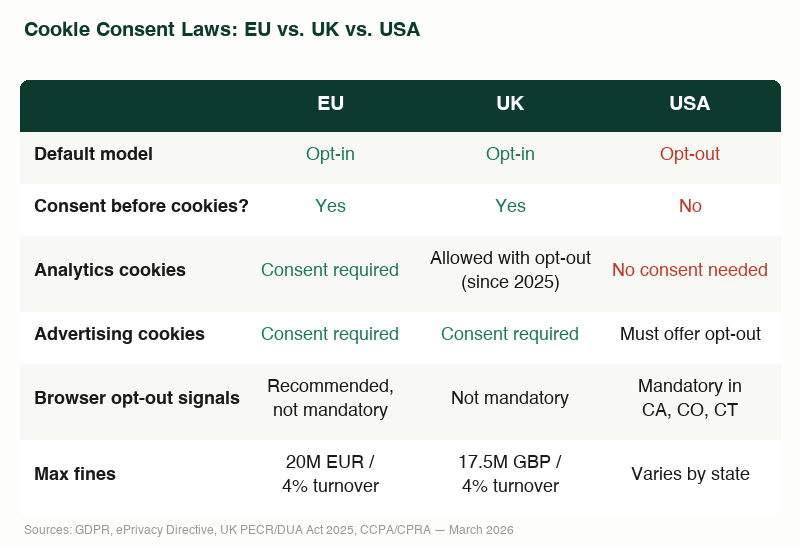
What triggers the requirement
In the EU and UK, the trigger is the act of storing or reading anything on a user’s device.
Not just cookies. Local storage, fingerprinting, tracking pixels. If it touches the user’s device and isn’t strictly necessary, you need consent first.
In the US, the trigger isn’t the cookie itself. It’s the collection, sale, or sharing of personal information. Cookies are only relevant because they’re a mechanism for collecting that data. The obligation is to offer an opt-out, not to ask permission upfront.
Why most websites have a cookie banner
For a lot of them, it’s not because they thought about it.
Because they loaded Google Analytics, embedded a YouTube video, used Google Fonts from Google’s CDN, or dropped a Facebook Pixel on the page. Each of these creates a connection to a third-party server and transfers user data.
WordPress (and many other website builders) makes this worse.
Many themes load Google Fonts by default. Plugins embed external services without telling you (directly). Even a simple contact form plugin might send data to a third-party server.
So the website needs a cookie banner. Not because the content requires it, but because the tech stack created dependencies that can’t run without consent.
How to NOT need one
This is what I do for my web design, and it’s simpler than you may think.
Host fonts locally. Download the font files, put them on your own server. No connection to Google. No data transfer. No consent needed.
No external CDNs. No Bootstrap from a CDN, no jQuery from Google. Everything the website needs lives on the same server. Downloaded. Local.
No tracking. No Google Analytics, no Facebook Pixel, no retargeting. Server logs are enough for most small business websites. If you want analytics, self-hosted Matomo can work without consent in the EU.
No social media buttons with tracking. Plain links instead of embedded like buttons that load third-party scripts.
Videos and maps on click only. If a YouTube video or Google Maps embed is needed, load it after the user actively clicks.
That’s it. No external requests, no data transfers, no consent needed. No banner.
The downsides
There are trade-offs. (There are always trade-offs.)
No Google Analytics means no detailed traffic data. Luckily, there are many good Analytics alternatives that respect GDPR.
No third-party embeds means you can’t just paste a YouTube link and have it render inline. You need a click-to-load wrapper or a static thumbnail with a link. Slightly more work.
And if you run paid advertising with retargeting, you need tracking pixels. There’s no way around that. In those cases, a cookie banner isn’t a problem. It’s the correct solution.
For the vast majority of small business websites, service provider pages, and portfolio sites, none of these trade-offs matter. The website is faster, cleaner, and legally simpler without any of it.
What you actually get
Aside from not needing a banner, a website without third-party dependencies is:
Faster. Every external request costs time. Some cost seconds. A locally hosted website has zero third-party latency.
More reliable. If any CDN goes down, your site still loads. If a third-party change their terms, it doesn’t affect you.
Better for SEO. Google’s Core Web Vitals measure how fast your site becomes interactive. External scripts delay that. Without them, scores improve.
Better for users. No overlay blocking the content on first visit. The page loads, the content is there. Done.
How to check your own website
Open your website. Right-click, Developer Tools, Application tab (Chrome) or Storage tab (Firefox). Under Cookies, you’ll see what’s being set and by which domain.
If everything is from your own domain and technically necessary (session, CSRF token), you’re fine. If you see entries from google.com, facebook.com, doubleclick.net, or similar, you have a problem.
Disclaimer
I’m not a lawyer. This article describes the technical choices I make and the legal frameworks I’ve researched. It is not legal advice. If you need a legal assessment of your specific situation, consult an attorney specializing in data protection or IT law. The laws referenced here (GDPR, ePrivacy Directive, UK PECR, DUA Act 2025, CCPA/CPRA, and various US state privacy laws) are current as of March 2026.
The Bottom Line
A cookie banner is not a feature. It’s a symptom. It means your website has dependencies that transfer user data to third parties, and the law requires you to ask permission first.
You can either manage that with a consent banner. Or you can build a website that doesn’t need one.
I prefer the second option.